Agenda or Minutes: Which Document Answers Your Question?
Agenda or minutes: learn which public meeting record can show what was planned, what happened, and where to look when a detail is missing.
Agenda or minutes: if you need to know what a public meeting was expected to consider, start with the agenda; if you need to know what the body recorded afterwards, look for the minutes. The distinction sounds simple, but it matters when you are tracing a topic, checking a decision or working out what a document can actually tell you.
Use these distinctions to choose a useful starting point, then check the document’s own headings and any linked records. An agenda is a map of intended business. Minutes are a selective account of what took place, not a word-for-word transcript.
1. What question are you trying to answer?
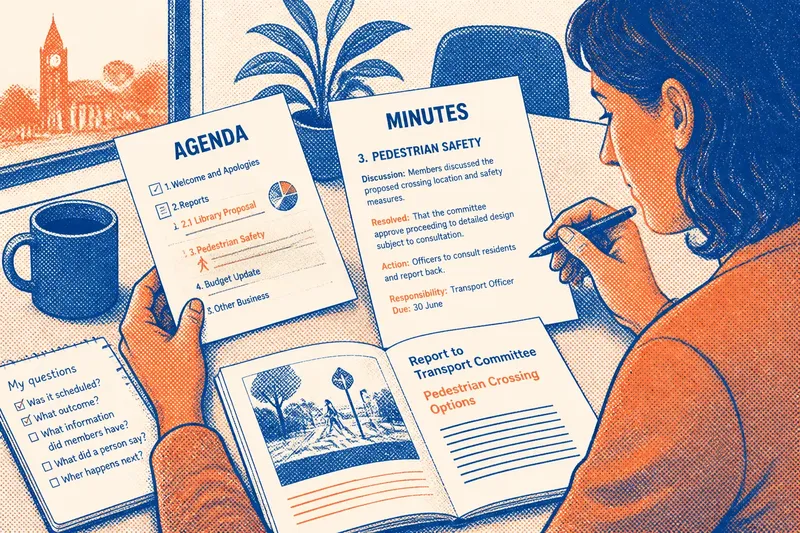
Turn your interest into a specific question before opening a file. “What happened with the library proposal?” could mean several things: Was it scheduled for discussion? Did members consider it? Was a motion recorded? Did the body make a decision?
Those questions point to different evidence. An agenda can show whether an item was listed and how it was labelled. Minutes can show what the body recorded about the meeting’s consideration and outcome. Neither document necessarily answers every part of a broad question.
For example, imagine you want to know whether a neighbourhood crossing was discussed at a transport committee meeting. The agenda can help you identify a scheduled item under a heading such as “pedestrian safety”. The minutes may say that members discussed the crossing, deferred consideration or agreed to a recorded action. If you need the precise words spoken, neither may be enough; look for an official recording or transcript if one exists.
2. What does an agenda tell you before a meeting?
An agenda sets out the business planned for a meeting. It can list reports, proposals, presentations, questions, motions or other items, often in an order intended to help the chair run proceedings. The document is useful for seeing what members were expected to address and for locating a subject within the body’s formal schedule.
Read beyond the short item title. A report attached to an agenda may explain the issue, set out options, identify a recommendation or include supporting papers. Check the meeting date, committee name, item number and attachments: the same subject can appear in several bodies, and a report may be revised or replaced.
Agenda wording is not a record that discussion happened. A scheduled item can be postponed, withdrawn, handled differently or left unresolved. Treat it like a shopping list: it tells you what someone planned to pick up, not what made it into the basket.
3. What do minutes record after a meeting?
Minutes are the formal record approved by a public body, subject to that body’s procedures. They commonly note attendance, apologies, agenda items, motions, decisions and actions. Some include a short account of discussion; others record only the essential outcome. Their purpose is to document proceedings, not reproduce every contribution.
Look for verbs that signal what the record says happened. “Resolved” or “decided” may identify a formal outcome. “Noted” can mean that information was received without a decision. “Deferred” indicates that consideration was put off. “Referred” may point to another committee or officer for further work. The precise meaning depends on the institution’s conventions, so read the surrounding text rather than treating one verb as universal.
Minutes can also name who is responsible for a follow-up and when it is due, if those details were recorded. That makes them useful for tracing the body’s stated next action. They do not necessarily show whether the action was later completed; for that, search subsequent minutes, progress reports or the relevant decision record.
4. How can you search both documents efficiently?
Begin with the public body and meeting date, then search its meeting page or records system. If you only know the topic, try a distinctive phrase as well as likely alternatives. A crossing might be described as a “road safety scheme”, while a school matter could appear under a committee’s formal name rather than the everyday term.
- Check the meeting identity: confirm the body, date and meeting type before relying on a match.
- Search the agenda: scan item titles, report names and attachments for the planned subject.
- Open the minutes: find the same item number or wording and read the recorded outcome in context.
- Compare versions: note whether the agenda labels a report as revised or whether minutes are marked draft or approved.
- Follow references: use any report, action, later meeting or decision record named in the text.
Some councils and committees publish a single meeting pack containing the agenda and papers, then add minutes later. Others organise files in separate sections. If a search result opens a long PDF, use its contents list or document search, but verify the page heading because a matching word might refer to another item.
5. Which document answers common meeting-record questions?
Was this topic scheduled for discussion?
Start with the agenda and its supporting papers. A relevant item shows that the subject was listed for planned business, but it does not establish that members discussed it.
What outcome did the body record?
Start with the minutes and locate the matching agenda item. Check whether the entry records a resolution, a note, a deferral or another outcome rather than inferring a decision from the item title.
What information did members have before them?
Open the agenda pack, including reports and appendices. Minutes may refer to a paper by name without reproducing its contents, so the attached material is often the better source for the information presented.
What did a particular person say?
Minutes may summarise contributions or omit individual remarks altogether. Look for an official recording or transcript where available, and distinguish that source from the formal minutes.
6. What if the agenda and minutes do not match?
A difference does not automatically mean one document is wrong. The agenda records intended business at the time it was prepared; the meeting may then alter its order, postpone an item or respond to new information. Minutes capture the proceedings as recorded, often in a concise form.
Check whether the minutes are a draft or an approved version. A draft can be corrected before approval. Compare the agenda item number, report title and meeting date, then look at later minutes for a carried-over item or a correction. If an agenda lists a decision but the minutes say it was deferred, the minutes are the relevant record of what the body recorded at that meeting.
Where the issue turns on a formal resolution or exact wording, find the decision notice, signed record or other official document identified by the institution. The relevant document type and access rules can depend on the body’s procedures and local requirements; consult its records office or a qualified adviser if the matter has legal consequences.
7. How should you describe what you have found?
Be precise about what each source supports. You can say that an agenda listed an item, that minutes recorded a particular resolution, or that a report was included in the meeting papers. Avoid turning a planned discussion into a claim that discussion took place, or treating a brief minute as proof of every detail surrounding an outcome.
When sharing a finding, give the body, meeting date, item title and document type. If an important detail is absent, say that the minutes do not record it rather than claiming it did not happen. That small distinction keeps the public record useful: an agenda shows what was planned, minutes show what was formally recorded, and each answers a different question.